Dirt Micro Sprint
Know everything about iRacing's Dirt Micro Sprint including technical specs, braking tips and more.
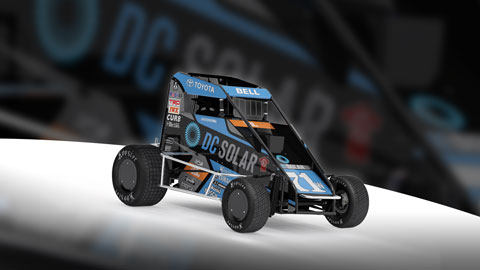
Image © iRacing.com Motorsport Simulations
Chassis
Power
Brakes
Bias Range
Adjustable
ABS
None
Downforce
Medium
Setup
Advanced
How the Dirt Micro Sprint Handles Braking
The Dirt Micro Sprint presents unique braking challenges due to its lightweight construction and dirt track conditions. At just 372kg wet weight with driver (winged configuration), this motorcycle-engined machine demands precise brake modulation on loose surfaces where traction is constantly changing. The solid axle front and rear suspension configuration means brake-induced weight transfer affects the entire end of the car simultaneously, making setup adjustments critical for consistent brake performance.
Shock tuning directly influences braking stability and rotation. Higher front bump stiffness transfers load onto the front tires more quickly under braking, which can induce understeer and reduce turn-in response. Conversely, lower front bump values slow load transfer, potentially causing oversteer during braking. Rear rebound settings are equally important—higher rear rebound increases understeer under braking, while lower values induce oversteer and sharper turn-in. Finding the balance between these settings determines whether you can trail-brake effectively into corners or need to complete braking in a straight line.
Crossweight adjustments also affect braking behavior, particularly on the asymmetric dirt oval layout. Increasing crossweight tightens the car overall, which can help maintain stability under braking but may limit rotation. Monitor tire temperatures after sessions to identify if braking loads are balanced correctly across the front axle—the left-side tires should typically show higher temperatures due to the oval configuration.
Stop Guessing, Start Improving
Many drivers slam the brakes with all their strength, but the fastest modulate pressure, use the brake to rotate the car, and exit as fast as possible. Train that skill here.
Train Anywhere, Anytime
Browser-based training works with any racing pedals or controllers. Fanatec, Thrustmaster, Logitech, Simucube — no installation required.
Pro-Designed Exercises
Access exercises created by professional sim racers like Suellio Almeida. Learn the exact braking patterns used by the fastest drivers.
Import Dirt Micro Sprint Telemetry
Drop your Garage61 lap CSV and extract braking data for every corner. Generate personalized practice exercises based on YOUR telemetry, not generic patterns.
Track Your Progress
View session history, performance trends, and best scores. Watch yourself improve over time and stay motivated to practice.
And There's Much More
Improve your braking technique with this car and much more:
Create Custom Exercises
Build from templates, draw brake curves, or record with your pedal
Schedule Your Training
Plan practice sessions and track your consistency across weeks
Brake Master Ratings
Earn rankings and compete on leaderboards as you improve
Exercises & Progress Tracking
Practice exercises and track your progress completely free.
No install needed • Works in browser
3 Essential Setup Tips
Tip 1
Brake Bias
Brake bias controls front/rear brake force distribution. Start with 56-58% front for most cars. Engine placement matters: front-engine cars need more front bias (58-62%), mid-engine cars run balanced (54-58%), rear-engine cars need less (50-54%). Understeering under braking? Add 1-2% front bias. Rear feels loose in braking zones? Reduce front bias by 1-2%.
Tip 2
Know Your Car
Check if your car has ABS, traction control, or brake mapping. ABS allows later braking but can increase stopping distance—adjust activation threshold in setup. High-downforce cars brake later and harder at speed but lose grip quickly as downforce bleeds off. Low-downforce cars require earlier, progressive braking with more trail-braking to rotate.
Tip 3
Quick Fixes
Locking fronts frequently? Reduce front bias 1-2% or brake earlier with gradual pressure. Car won't turn in under braking? Increase front bias 1% and practice trail-braking deeper into corners. Rear unstable in braking zones? Reduce rear bias or use smoother pedal release.
Master Your Braking
Common questions about braking in this car. Practice these techniques in our free app.
What's the best brake bias for the Dirt Micro Sprint?
What's the best brake bias for the Dirt Micro Sprint?
Does the Dirt Micro Sprint have ABS or traction control?
Does the Dirt Micro Sprint have ABS or traction control?
Why do my brakes lock up in the Dirt Micro Sprint?
Why do my brakes lock up in the Dirt Micro Sprint?
How late can I brake in the Dirt Micro Sprint compared to similar cars?
How late can I brake in the Dirt Micro Sprint compared to similar cars?
How can I practice braking in the Dirt Micro Sprint?
How can I practice braking in the Dirt Micro Sprint?
Explore MoreDirt Cars
Similar cars you might be interested in learning
Ready to Master the Dirt Micro Sprint?
Put this knowledge into practice with Braking Lab's interactive brake training exercises. Import your telemetry and get personalized feedback.